Samsung Phone Layout Ideas To Customizing Your Galaxy Phone

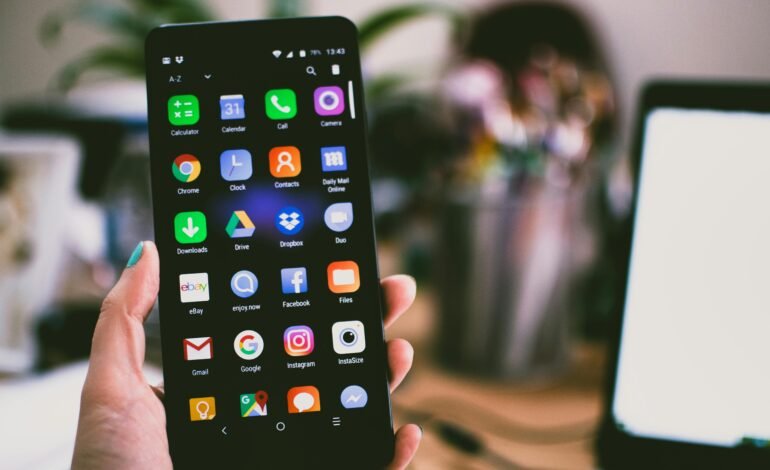
Samsung smartphones are known not only for their powerful hardware but also for their flexible software experience. With Samsung One UI, users get full control over how their phone looks and works. From clean minimalist setups to creative and productivity-focused designs, Samsung phone layout ideas allow you to personalize your device in a way that matches your lifestyle. This guide explains everything in clear language so even beginners can customize their phones with confidence.
What is a Samsung phone layout?
A Samsung phone layout is the general layout of your home screen, apps, widgets, folders, icons, wallpaper and lock screen. It determines the way information is represented and the ease with which you can access your apps. The One UI structure of Samsung is tailor-made to be comfortable, especially on large screens, so that with the help of one hand, one can access important sections. Samsung offers more sophisticated layout options compared to ordinary Android skins, and no additional applications had to be downloaded.
The reason why you should customize your Samsung phone layout.
Personalizing your Samsung phone layout enhances the look and functionality of your phone. A structured design will help save time, decrease stress and ease the everyday use of phones. With the apps in place and the judicious use of widgets, your phone will be more productive. Just as the user must remain vigilant on the digital safety issues, such as FBI Warns iPhone Android Users, the arrangement of the phone layout will also contribute to the performance and the minimization of useless background your phone. Understanding Samsung One UI Layout System
Samsung One UI is a middle path between beauty and functionality. It lets the user manipulate grid sizes, resize the size of the different widgets, create folders, and control the space between the icons. The interface puts the major areas of interaction on the bottom side of the screen, which is easily accessible with a single hand. One UI’s ideas of customization are safer, smoother, and battery-friendly than third-party launchers. One UI vs Third-Party Launchers.
Although third-party launchers are highly customizable, they can impair performance and battery life in some instances. One UI already has many features that users require, like gesture controls, edge panels, as well as layout requirements. In the majority of cases, the native Samsung customization is the most adequate choice.
Samsung Phone Minimalism Designs
The uncomplicated Samsung phone design aims to be simple and clear. This design eliminates clutter, and only the necessary applications are kept on the home screen. It typically involves a plain wallpaper, a basic clock extension and a few application icons. This is a clean Samsung home screen that helps lessen distractions and better focus, as well as has good battery life since fewer widgets operate in the background.
Aesthetic Samsung Phones Design
People who value aesthetics like designs will like the aesthetic layouts. These designs are usually done in pastel colors, gradient wall papers, similar icon packs, and soft widgets. The Samsung aesthetic home screen designs appear cool and yet are practical. It is the consistency that counts in colors and fonts.Samsung the theme ideas are based on the Galaxy Themes Store, which help one get a professional and appealing appearance without high skills.
Samsung Productivity-Based Layout Concepts
The productivity layouts are oriented towards those users who depend much on their phones to work, study, or plan their daily activities. At the most, this Samsung productivity layout incorporates calendar apps, reminder apps, and task management applications on the home screen. Isolating work apps and personal apps help to balance and be more efficient. Proper layout of the widgets will enable the user to determine both the schedule and work without having to open numerous applications.One-Handed Samsung Phone Layout Ideas
One hand can find using large screens challenging, and Samsung layouts of One UI eliminate this issue. One-handed layouts put the icons, folders, and the widgets nearer to the bottom of the screen. One-hand mode is also an inbuilt feature at Samsung that minimizes the size of the screen temporarily, hence making the navigation comfortable. This arrangement best suits those users who often utilize their phones as they are walking or doing other chores.
Samsung Widget Layout Ideas
The number of Samsung phone widgets has a significant influence.Samsung widget concepts are performance-enabled and do not conflict with One UI. Third party widgets are also a possibility, although care should be taken not to crowdfall the screen. A balanced widget layout will not slow down the phone displaying helpful information at a glance.
Samsung Lock Screen Designs
Samsung also provides a high level of customization of the lock screen, and many of the users do not think about it.You can replace clock styles, notification preferences, and the design of the Always-On Display. Lock screen widgets enable one to have access to information without unlocking the phone. A good lock screen enhances the security and convenience.Samsung Theme and Icon Layout Ideas.
Icons and themes have powerful effects on the tactile experience of a Samsung phone.Samsung Galaxy Themes come with all the visual elements such as wallpapers, icons and system colours. It is a good idea to pick a theme that fits the appearance of your home screen to give it a slick and professional appearance. The visuals of icon packs must be kept in line with each other in order not to confuse the viewer. Minimal and simple icons are most appropriate when used in the long term.
Samsung Cell Phone Layout Ideas on No Launcher
Users think that launchers are needed to make their device personal, though Samsung also has powerful tools built-in.With One UI settings and Samsung Good Lock app, a user can manage the layouts, folders, gestures and animations. Good Lock modules such as Home Up and LockStar are able to provide more advanced customization and maintain the security of the system.
Sophisticated Samsung Customization Layout Secrets
Samsung Good Lock can be used to customize layouts by advanced users through it.It is an official Samsung application that gives extensive control over home screen behavior, lock screen appearance and status bar layout. Since it is a Samsung product, it is designed using high standards of security and performance. The fact is that the use of official tools guarantees credibility and reliability, which is in line with Google E-E-A-T.Common Samsung Phone Layout Mistakes.
Most of the users clutter their home screens with excessive number of widgets and icons. This does not only appear to be untidy, it also has an impact on usability. Inefficiency is brought about by poor color contrast, overuse of animations, and placing icons in unrelated locations. An excellent design is one that is well balanced in terms of beauty and functionality.
Samsung Phone Design Ideas by Model
Best phones Samsung Galaxy S series are compatible with high-quality minimalistic or work layouts. Phones in Galaxy A series enjoy balanced designs that combine both aesthetics and performance.Foldable phones Galaxy Z Fold and Flip need to be designed in a task-focused way that exploits dual screens. The ability to customize layouts depending on the phone size enhances experience in general.Security, Performance, and Trust.
It is essential to use safe customization. Do not install new applications that seek to get unnecessary permission. The native tools that Samsung uses are security based. Being aware of smartphone dangers, like warnings mentioned in FBI Warns iPhone Android Users, will allow users to keep their data safe and still provide them with customization opportunities.
Final Thoughts
Samsung phone layout ideas give users complete freedom to design their devices according to their needs. Whether you prefer a clean, aesthetic, or productivity-focused setup, Samsung One UI offers reliable tools to achieve it. By using official customization features and keeping layouts simple and organized, you can enjoy a smooth, secure, and personalized smartphone experience.
Frequently Asked Questions (FAQs)
What is the best Samsung phone layout?The best layout depends on your usage. Minimalist layouts suit simple users, while productivity layouts are ideal for work and study.
Can I customize Samsung layout without a launcher?
Yes, Samsung One UI and Good Lock provide advanced customization without third-party launchers.
Do widgets affect Samsung phone performance?Using too many widgets can affect performance, but Samsung’s built-in widgets are optimized and safe.
Which Samsung layout saves the most battery?
Minimalist layouts with fewer widgets and animations help extend battery life.
Can I reset my Samsung phone layout?
Yes, you can reset your layout through One UI Home settings if needed.